
Fees
Structure
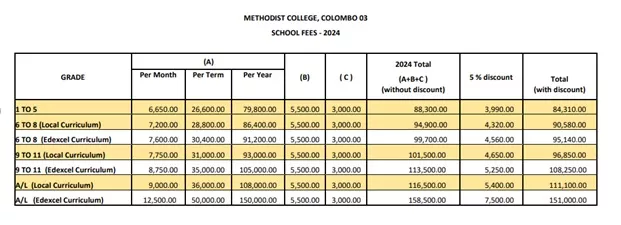
(A) – Facility Fees (B) – Security Fees (C) – Stationery Fees
Facilities Fees can be paid monthly, termly or yearly, according to the structure above.
- For monthly payments
Please inform the Principal in writing about your intention to pay monthly. Fees must be paid by the 10th of each month, for that particular month (e.g. by the 10th of January for the month of January)
- For termly payments
Fees paid termly must be paid by the 31st of January for the 1st Term, the 30th of June for the 2nd Term, and the 30th of September for the 3rd Term.
- For yearly payments
Parents who pay the whole year’s fees by the 31st of January will receive a 5% discount on the Facilities Fees payable for the year. This discount does not apply to Security Fees, Stationery Fees or Lab Fees.
Modes of Payment
You can use any of the following methods convenient to you to make payments
Online transfer
If you choose to make an online transfer, please include your daughter’s name, class, and the admission number in the reference field.
The school bank account details are as follows:
Hatton National Bank, Kollupitiya.
A/C No. 115010139249
(Principal, Methodist College)
Direct deposit to HNB bank counters or cash deposit machines
You can also make your payments at any HNB branch using one of these methods. Please include your daughter’s admission number in the relevant field as the Reference. Payments made without the admission number will not be credited to any student’s account.
The school bank account details are as follows:
Hatton National Bank, Kollupitiya.
A/C No. 115010139249
(Principal, Methodist College)
Seylan Bank Internet Payment Gateway
Click on the link shown below. You will be redirected to the Seylan Bank Internet Payment Gateway, where you can make your payment using your credit card. Please include your daughter’s admission number, name, and class.
Using the ‘Pay School Fees’ feature on the Talkative Parents App
When you open this feature on the app, you will be redirected to the Seylan Bank Internet Payment Gateway. You can make a payment using your credit card, as mentioned in the point above (3).
HNB SOLO App
Download this app from the Google Play Store/Apple App Store and register your bank account. Go to the “Billers” option, select Methodist College and enter your daughter’s 5-digit admission number, along with double zero (00) in front. The app will accept this 7-digit code. Enter the amount that needs to be paid and complete your transaction.
Cash Payment
Direct cash payments can be made to the school office during school hours.